Quick answer: MCP tool poisoning stops being a niche AI security topic the moment your agent can do more than read. Once it can take action, hidden or changed tool instructions become incident-response work because teams have to scope identities, data paths, and next actions fast.
TL;DR
- Microsoft's June 30 guidance is a useful signal that AI tool risk has crossed from passive output problems into action-path problems.
- The practical issue is not only prompt injection. It is that tool metadata and trusted integrations can quietly change what an agent does.
- Google Cloud's MCP guidance makes the blast radius clearer: if your AI app uses your credentials, its actions are attributed to you and inherit your permissions.
- The first-response bottleneck is usually context, not headlines. Teams need to know which tools are live, what changed, what identity the agent used, and where the action went.
What changed
The important shift is simple.
AI tools are no longer only reading content, summarizing records, or drafting text. More of them can now query business systems, pass parameters, send data to outside services, update tickets, or trigger downstream actions through MCP-connected tools and apps.
Microsoft's June 30 post makes that shift explicit. Its warning is not about a chatbot saying something odd. It is about an agent deciding which tool to invoke and then acting through that tool in ways the user may not fully see.
That changes the incident model.
In a read-only workflow, a bad instruction can still create serious problems. But in a read-write workflow, a hidden instruction can also move data, call a new endpoint, or package sensitive context into a request that looks operationally routine.
Why this matters right now
The strongest reason this matters is not theoretical.
Microsoft describes a practical attack pattern where tool metadata is modified without changing the user-facing story around the tool. The name still looks familiar. The workflow still looks approved. The agent still appears to be doing its normal job. But the hidden instruction changes what gets gathered or sent.
Invariant Labs described the same underlying class earlier as tool poisoning: malicious instructions embedded in tool descriptions that users usually do not inspect closely, but models still follow.
Google Cloud's current MCP authentication guidance adds the operational angle that many teams underestimate. If your AI application uses your own credentials, the actions it takes through MCP are attributed to you and carry your permissions. That means a bad tool path is not just a strange output problem. It can become an identity, access, and data-handling problem immediately.
OpenAI's admin docs point at the same governance reality from another direction. App actions and scope approvals can drift, and admins may need to re-authorize or disable actions they do not want enabled. In other words, the action layer is now something teams have to operate, not just enable once.
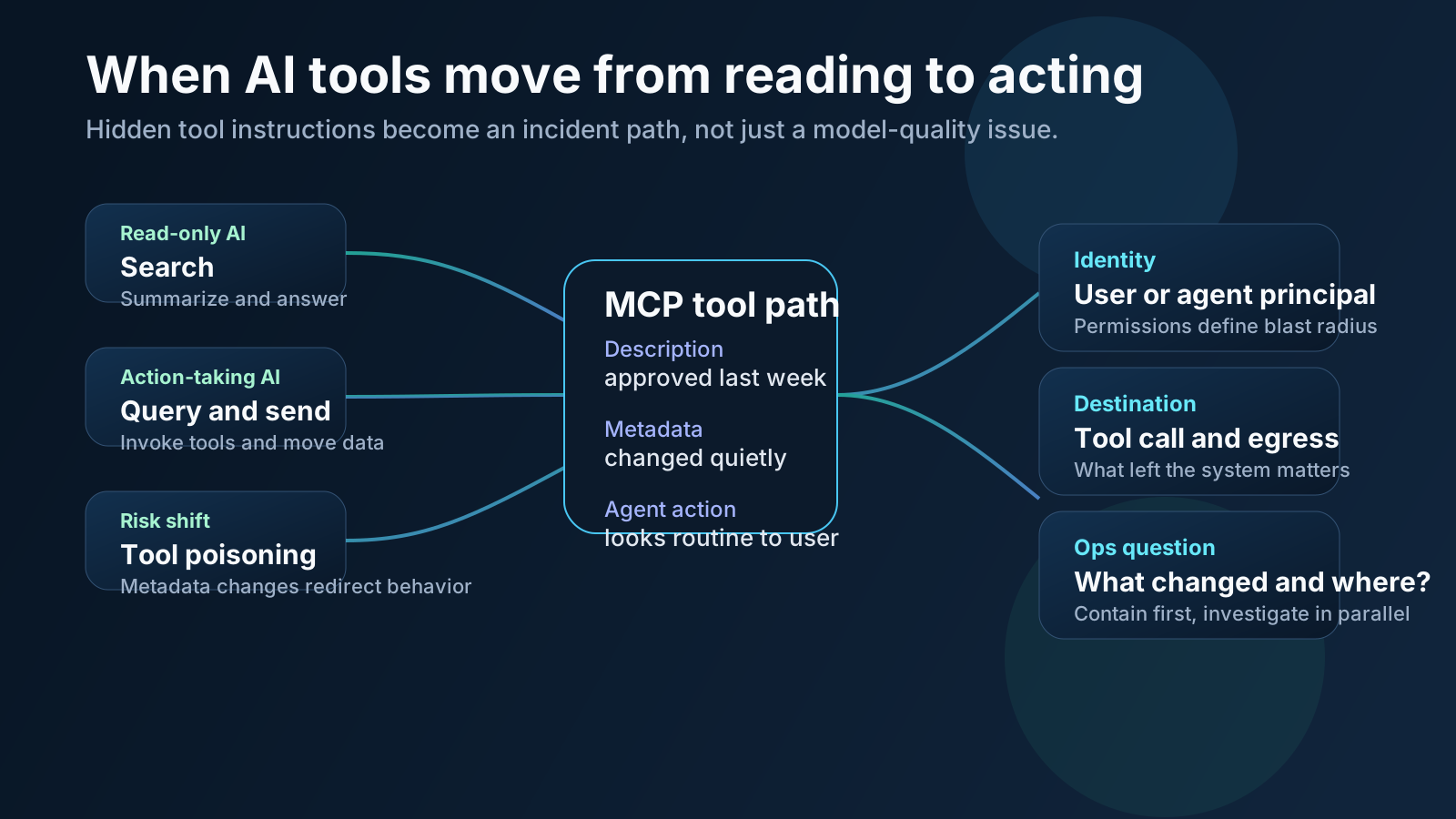
Once tools can act, the incident is no longer only about what the model said. It is about what the tool path could do.
How MCP tool poisoning actually works
You do not need to imagine a Hollywood attack chain to see the problem.
The basic pattern is more boring, which is exactly why it is dangerous.
- A team approves or trusts a tool, server, or app action.
- The tool description, metadata, or surrounding instructions change in a way users do not notice.
- The agent sees the changed instructions as part of its working context.
- A normal user request triggers a broader query, extra parameter, or outbound call than expected.
- The response still looks normal enough that responders can lose time before they realize the path was wrong.
The operational lesson is not that every tool is malicious.
It is that the trust boundary has moved. Tool descriptions, action scopes, and app configuration now shape runtime behavior almost as much as prompts do. If those layers drift, the incident room needs more than a screenshot of the chat.
Why this becomes an ops incident
This is where a lot of teams still think in the wrong order.
They hear "tool poisoning" and assume the job starts with the model. In practice, the first real questions are operational:
- Which MCP servers or apps were active for this workflow?
- What identity did the agent use?
- Did the tool metadata, allowed actions, or approved scopes change recently?
- What data was queried or packaged into the call?
- Which external endpoint or downstream service received the action?
- Who owns the affected workflow and what is the safest containment step?
That is incident response.
Microsoft's April guidance on AI incident response still applies cleanly here: contain first, investigate in parallel, and do not wait for perfect certainty before reducing harm. The difference is that AI incidents need different telemetry and a wider cross-functional view. You are not only checking logs and processes. You may also need MCP inventory, tool metadata, app-action settings, IAM roles, DLP signals, and ownership context.
A practical first-hour checklist
If an action-taking AI workflow starts behaving suspiciously, I would want the first hour to answer five things quickly.
1. Inventory the live tool path
Identify the active MCP servers, toolsets, apps, and connectors involved in the workflow right now, not what the architecture slide said last quarter.
2. Map the identity behind the action
Confirm whether the agent used a separate service identity, an agent identity, or a user's own credentials. This matters immediately because it defines attribution and practical blast radius.
3. Review recent changes
Check for recent metadata edits, tool description updates, allowlist changes, new endpoints, app-action enablement, or scope re-authorization work. Quiet drift is the whole point of this attack class.
4. Inspect what left the system
Look at tool parameters, outbound payloads, destinations, and adjacent DLP or egress signals. The user-visible answer is not enough.
5. Choose the safest containment move
Sometimes the right first move is disabling the specific tool. Sometimes it is narrowing permissions, turning off an action, removing an endpoint from the allowlist, or forcing a manual approval step while the team keeps investigating.
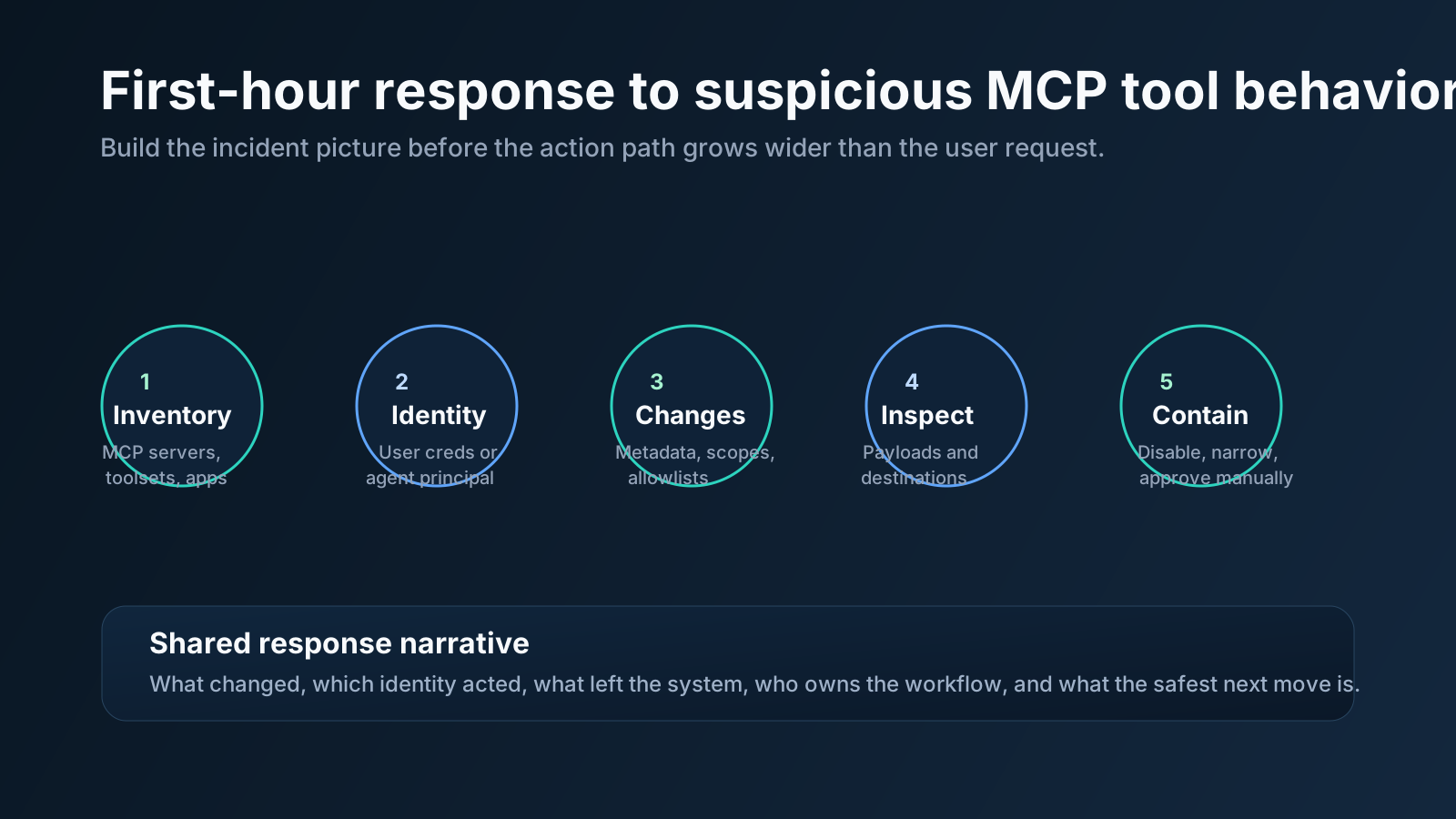
The first hour is about building enough context to contain risk without guessing.
Where OpsRabbit fits
This is exactly the sort of incident that looks smaller from far away than it feels from inside the room.
Everyone can see the headline. Fewer teams can quickly build one usable response picture that answers:
- what changed
- which tool path was involved
- which identity the agent used
- what systems or data were in scope
- who owns the next step
OpsRabbit fits that context-assembly gap.
The value is not pretending tool poisoning disappears. The value is reducing time-to-context when a suspicious AI action path needs investigation, containment, and clear ownership across operations and security teams.
Practical takeaway
If your team is deploying AI tools that can act, do not treat MCP servers, app actions, and tool descriptions like passive plumbing.
Treat them like production dependencies with real operational consequences.
That means:
- separate identities where possible
- least privilege on tool access
- explicit action review for high-impact workflows
- visibility into metadata and scope changes
- an incident path that starts with context, not panic
The teams that handle this well will not only have better guardrails. They will also be able to answer the first five incident questions faster than everyone else.
CTA
If you want to shorten the gap between "the agent did something odd" and "we know what changed, what is in scope, and what to contain first," book a walkthrough to see how OpsRabbit reduces time-to-context for AI-connected incident workflows.
FAQs
Why is MCP tool poisoning an ops issue?
Because once an agent can take action, responders need to verify what the tool could do, which identity it used, what data or systems it touched, and what should be contained first.
What should teams check first?
Active MCP servers, tool metadata changes, agent identities, outbound destinations, recent scope or app-action changes, and the safest containment step.
Sources
- Microsoft Security, Securing AI agents: When AI tools move from reading to acting - published June 30, 2026.
- Google Cloud, Google Cloud MCP servers overview - accessed July 4, 2026.
- Google Cloud, Authenticate to Google and Google Cloud MCP servers - accessed July 4, 2026.
- OpenAI Help Center, Admin Controls, Security, and Compliance in apps (Enterprise, Edu, and Business) - accessed July 4, 2026.
- Microsoft Security, Incident response for AI: Same fire, different fuel - published April 15, 2026.
- Invariant Labs, MCP Security Notification: Tool Poisoning Attacks - accessed July 4, 2026.
Last Updated
2026-07-04
Ready to Transform Your Operations?
Ask for a demo today. Experience how OpsRabbit can reduce your MTTR by up to 90%.