Quick answer: ChatGPT's new Slack actions are not just another connector enhancement. Once admins enable actions like channel joins, reminders, file uploads, or profile updates, they also inherit a scope-review and approval path that can create confusing failures if ChatGPT settings and Slack approvals drift apart.
TL;DR
- OpenAI added Slack actions to ChatGPT Business, Enterprise, and Edu workspaces on June 19, 2026.
- Those actions can require extra Slack OAuth scopes and, in some environments, Slack admin approval or app reinstallation.
- The messy state is simple: an action is enabled in ChatGPT, but the related Slack scope has not been approved yet.
- When that happens, users usually see reconnect prompts or vague permission failures before the right admin even knows there is a mismatch.
What changed on June 19, 2026
OpenAI's June 19 release notes quietly changed the shape of the Slack integration.
Before, Slack in ChatGPT mostly looked like a search surface. After the update, ChatGPT can also take supported actions on a user's behalf, including joining a channel, creating a reminder, uploading a file, or updating a Slack profile when those actions are enabled.
That sounds small until you look at the control path.
Action-capable integrations are not governed by one toggle. They sit across at least three moving parts:
- the Slack app is enabled in ChatGPT
- the specific Slack actions are enabled in Action control
- the required Slack OAuth scopes are approved in the Slack workspace
If those three things stay aligned, the rollout stays boring.
If they do not, users discover the mismatch for you.
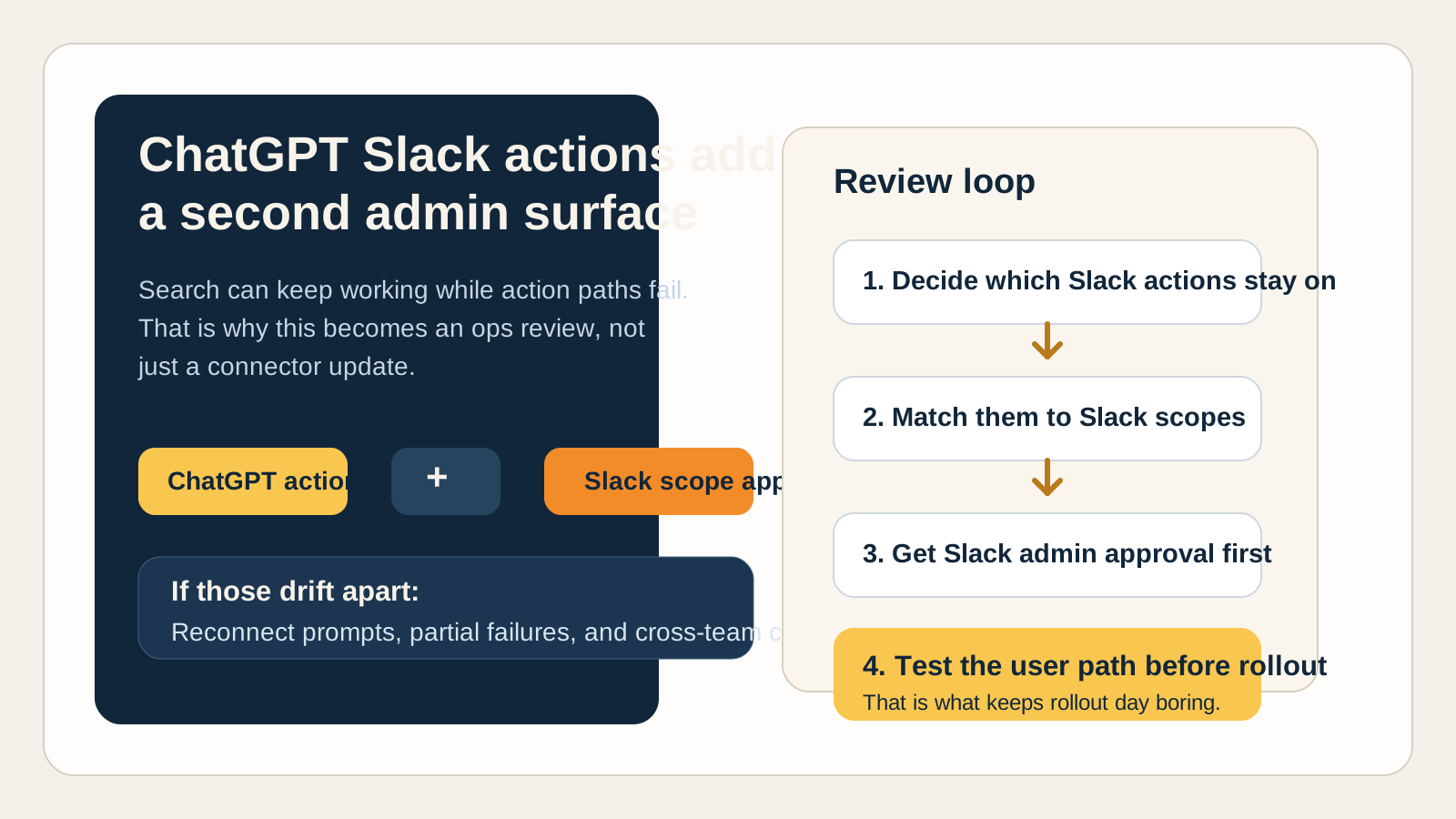
The operational risk is not the feature itself. It is the gap between enabled actions, approved scopes, and who owns each admin surface.
Why this is an access review issue
The release notes are already telling admins what kind of problem this is.
OpenAI says some Slack actions may require additional Slack OAuth scopes or approval from a Slack workspace or Enterprise Grid admin. Its Slack app guide adds more texture: users may be asked to reconnect Slack when a new action needs scopes their account has not granted yet, and previously available actions can continue working while the new one stays unavailable.
That is not a product education problem. It is an access review problem.
The risk is not that "Slack is broken." The risk is that one small capability gets enabled, one scope stays unapproved, and the first signal arrives as a support ticket that looks annoyingly vague:
- "It asked me to reconnect Slack."
- "I can still search Slack but I can't upload a file."
- "It worked for one teammate but not for me."
- "The action appears in ChatGPT, but it fails when I try it."
At that point, several teams may touch the same issue:
- the ChatGPT workspace admin
- the Slack admin
- the IT ops or support owner
- the user trying to do work
That handoff cost is why this belongs in operations.
Short answer
Treat new Slack actions in ChatGPT like a production access change.
You do not need a giant rollout program. You just need one clean review loop:
- Decide which actions should actually be available.
- Match those actions to the Slack scopes they require.
- Get the needed Slack approval in place.
- Disable the actions you do not want to authorize.
- Test the user path before broad rollout.
That is enough to avoid most of the avoidable noise.
The practical admin checklist
1. Review the action set, not just the app name
The OpenAI Slack app documentation lists actions like joining a channel, creating a reminder, uploading a file, and updating a Slack profile.
That matters because "Slack is enabled" is not a useful control statement on its own. The meaningful question is which actions are live for users right now.
2. Match actions to the scopes they can trigger
OpenAI explicitly lists additional scopes that may be requested for Slack actions, including:
channels:write,groups:write,im:write, andmpim:writefor joining or leaving conversationsreminders:writefor remindersfiles:writefor file uploadsusers.profile:writefor profile updates
If your workspace does not want one of those scopes approved, the answer is not "hope users never click it." The answer is to disable every action that depends on that scope.
3. Coordinate with Slack admin approval paths early
OpenAI notes that organizations using Slack Enterprise Grid or Slack scope approvals may need a Slack admin to approve or reinstall the ChatGPT Slack app before newly enabled actions will work.
That is the operational trap: ChatGPT can show the action before Slack has accepted the approval path needed to make it work cleanly.
4. Remember that Slack scope state can get sticky
Slack's OAuth documentation is the subtle but important source here. It says an app can gain additive scopes when installed again with new scope requests, and those scopes are not removed from an existing token unless the token is revoked entirely.
That means scope review is not just about first install. It is also about what changed later and whether your team understands the current effective permission set.
5. Expect reconnect noise if you skip the review
OpenAI's Slack app guide is refreshingly direct: users may be asked to reconnect Slack when ChatGPT needs a Slack OAuth scope that has not been granted yet.
That means your first support symptom can be a reconnect prompt, not a crisp admin alert.
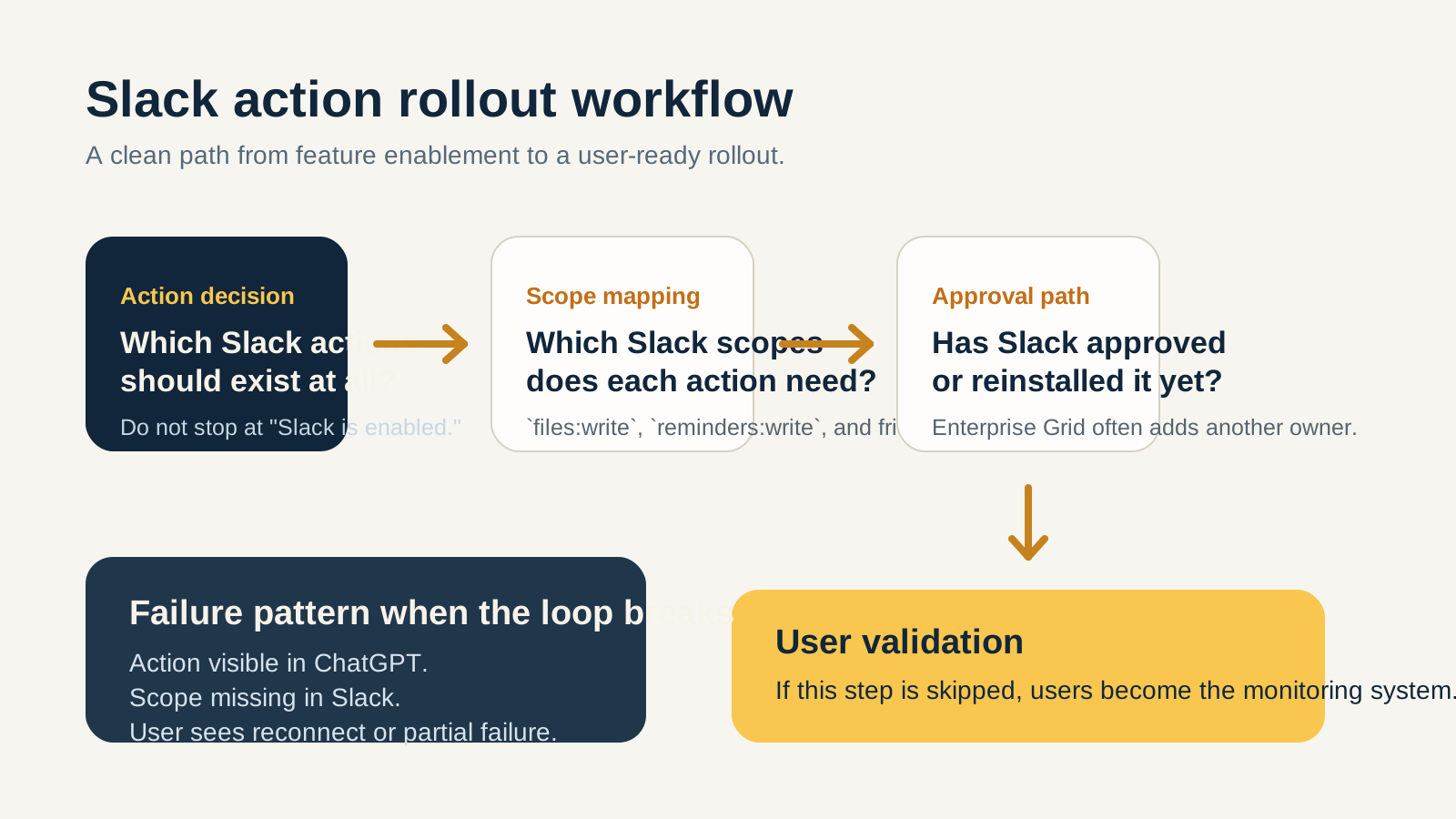
The clean rollout path is simple: action decision, scope decision, approval, then user validation.
What the first bad hour looks like
This is the part that usually burns time.
Support hears that a Slack action failed. The ChatGPT admin confirms the app is enabled. The Slack admin asks which scope is missing. The user says search still works, so they assume the integration is healthy. Someone else wonders whether a reconnect is enough or whether the app needs to be reapproved.
None of those questions are especially hard.
They are just scattered across different systems and owners.
That is why even small rollout mismatches feel bigger than they are. The team is not solving a deep technical failure. It is rebuilding context from four different places while the user waits.
Where OpsRabbit fits
OpsRabbit is useful in the middle of that messy hour.
The real bottleneck is not knowing that "ChatGPT plus Slack exists." It is getting fast answers to the questions that drive safe action:
- what changed recently
- which action is failing
- which scope or approval path is involved
- who owns the next decision
- what should be disabled, retried, or reapproved first
That is time-to-context work.
If you can compress that, these rollout issues stay small. If you cannot, a modest feature update turns into a cross-team guessing game.
Final thought
The June 19 Slack rollout should not scare anyone.
But it should reset how teams talk about action-capable AI integrations.
Once ChatGPT can do more than search Slack, the integration is no longer just a convenience feature. It is part of your access surface. That means actions, scopes, approvals, and rollback choices need the same boring discipline you would apply to any other production-adjacent SaaS change.
That boring discipline is what keeps rollout day boring.
FAQs
Why can a Slack action fail while Slack search still works?
Because search and action paths do not always rely on the same scopes. An already-approved search capability can continue working while a newly enabled action fails until the additional scope is approved.
What should admins check first?
Check whether the action is enabled in ChatGPT, whether the required Slack scope has been approved, and whether the user needs to reconnect after the approval path is complete.
Sources
- ChatGPT Enterprise & Edu - Release Notes - OpenAI Help Center, June 19 to July 6, 2026 updates reviewed.
- ChatGPT Business - Release Notes - OpenAI Help Center, June 19 to July 6, 2026 updates reviewed.
- ChatGPT Slack app - OpenAI Help Center, reviewed July 8, 2026.
- Installing with OAuth - Slack Developer Docs, reviewed July 8, 2026.
Last Updated
2026-07-08
Ready to Transform Your Operations?
Ask for a demo today. Experience how OpsRabbit can reduce your MTTR by up to 90%.