Quick answer: OpenAI's better ChatGPT memory is not just a product upgrade. It is a governance decision because more persistent and more automatic personalization changes what should be remembered, when Temporary Chat should be preferred, and how admins investigate memory-influenced behavior.
TL;DR
- OpenAI's July 2026
Dreamingupdate makes ChatGPT memory more capable, more automatic, and more reviewable. - The Memory FAQ says memory sources can show what informed a personalized response, but it also says the view may not show every factor.
- Temporary Chats remain the cleanest default for work that should not create memory, and OpenAI says they do not create memories.
- Enterprise and Edu admins should use this rollout window to define policy, ownership, and support paths before better memory becomes a larger operational surface.
What problem are we solving?
AI memory sounds like a user-experience feature until the first admin question lands.
Then the conversation changes fast:
- What is ChatGPT allowed to remember?
- Which work should stay in Temporary Chat?
- Who investigates when memory looks stale, wrong, or oddly persistent?
- How should support decide whether the issue is memory, source inputs, or user expectations?
That is why better memory becomes an admin problem.
As soon as personalization gets stronger, AI stops being only a stateless assistant. It becomes a stateful work surface with its own policy, support, and review burden.
Why this matters right now
OpenAI's July 2026 Dreaming post is the clearest signal that memory is no longer a small side feature.
The company says it is rolling out a more capable and scalable memory system that synthesizes memory over time, keeps it fresher, and makes those synthesized memories reviewable through a memory summary page.
That is a meaningful shift.
It means memory is becoming:
- more automatic
- more useful across longer-running work
- more explainable than before
- more likely to create policy questions in managed environments
The timing matters too. OpenAI says this rollout begins with Plus and Pro users in the US, with Free and Go users following. Meanwhile, the Memory FAQ still says Reference Chat History is not yet available to Enterprise and Edu customers.
That is not a reason to ignore the feature. It is the reason to prepare now, while the operational blast radius is still smaller.
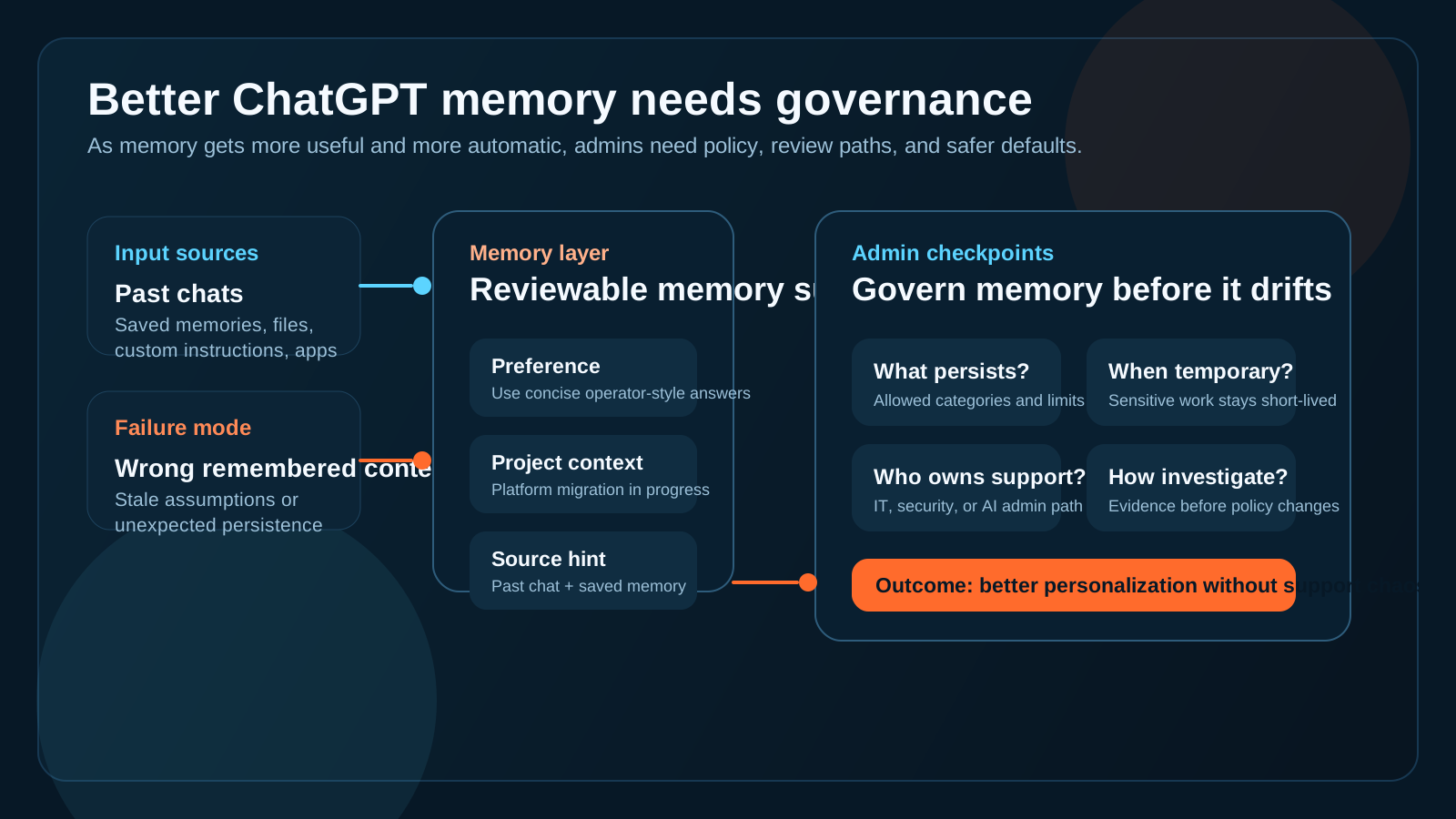
The useful question is no longer whether memory exists. It is whether your team knows how to govern it.
What actually changed in ChatGPT memory
The biggest shift is not just that ChatGPT remembers more. It is how that memory is created.
OpenAI describes three phases:
- saved memories in 2024
- saved memories plus an earlier dreaming layer in 2025
- a more capable dreaming-based architecture in 2026
That progression matters because memory moves from explicit note-taking toward a more synthesized understanding of the user over time.
OpenAI also says the memory summary is reviewable, and the Memory FAQ says memory sources can show what informed a personalized response. That is a real improvement for explainability.
But it is not perfect explainability.
The FAQ explicitly says memory sources may not show every factor that shaped an answer. So admins should treat source visibility as useful evidence, not as a complete forensic log.
Why better memory becomes a governance issue
The governance problem is simple: better memory means more persistent context, and persistent context needs rules.
That does not mean memory is unsafe by default. It means teams need to answer a few basic operating questions before memory-driven personalization becomes normal work behavior.
1. Decide what should be remembered
Not every useful detail should become durable context.
Teams should separate:
- stable preferences and working style
- project context that is useful for a limited period
- sensitive work that should stay temporary
- information that should never become durable memory
If those categories are fuzzy, support tickets will become policy debates.
2. Decide when Temporary Chat should be the default
OpenAI's Data Controls FAQ says Temporary Chats do not create memories, do not stay in history, and are deleted after 30 days.
That makes Temporary Chat a practical control, not just a privacy footnote.
For admins, the useful question is not whether Temporary Chat exists. It is when teams should actively prefer it:
- sensitive investigations
- executive or HR-related planning
- one-off external review
- work that should not shape future responses
3. Decide who owns memory-related support
When a user says, "ChatGPT keeps assuming the wrong thing," the fix is not always obvious.
The issue could be:
- a saved memory
- referenced chat history
- a connected source
- a custom instruction
- a misunderstood expectation about what ChatGPT should remember
Someone needs to own that path. Otherwise the issue bounces between IT, security, the AI admin, and the user.
4. Decide how to investigate memory-influenced behavior
Even with a reviewable summary and source hints, teams still need an operational playbook for weird outcomes.
The core investigation questions are usually:
- what seems to have influenced this answer
- whether the behavior is reproducible
- whether memory should be corrected, deleted, or bypassed
- whether Temporary Chat is the safer workflow for this use case
That is governance plus response, not just a settings question.
A practical five-step prep checklist
If you want better memory without turning it into admin drift, start here.
1. Define allowed memory categories
Write down what can be remembered, what should be short-lived, and what should never be durable.
2. Publish a Temporary Chat rule of thumb
Give users a plain-language rule for when temporary mode is smarter than persistent memory.
3. Document the current controls and caveats
Make it easy for admins and support staff to explain what is available on which plans and what is not.
4. Create a memory-support escalation path
Decide who handles reports of stale memory, wrong personalization, or confusing remembered context.
5. Treat memory issues like context incidents
When behavior looks wrong, gather evidence first, then decide whether the fix is policy, settings, user guidance, or a safer workflow.
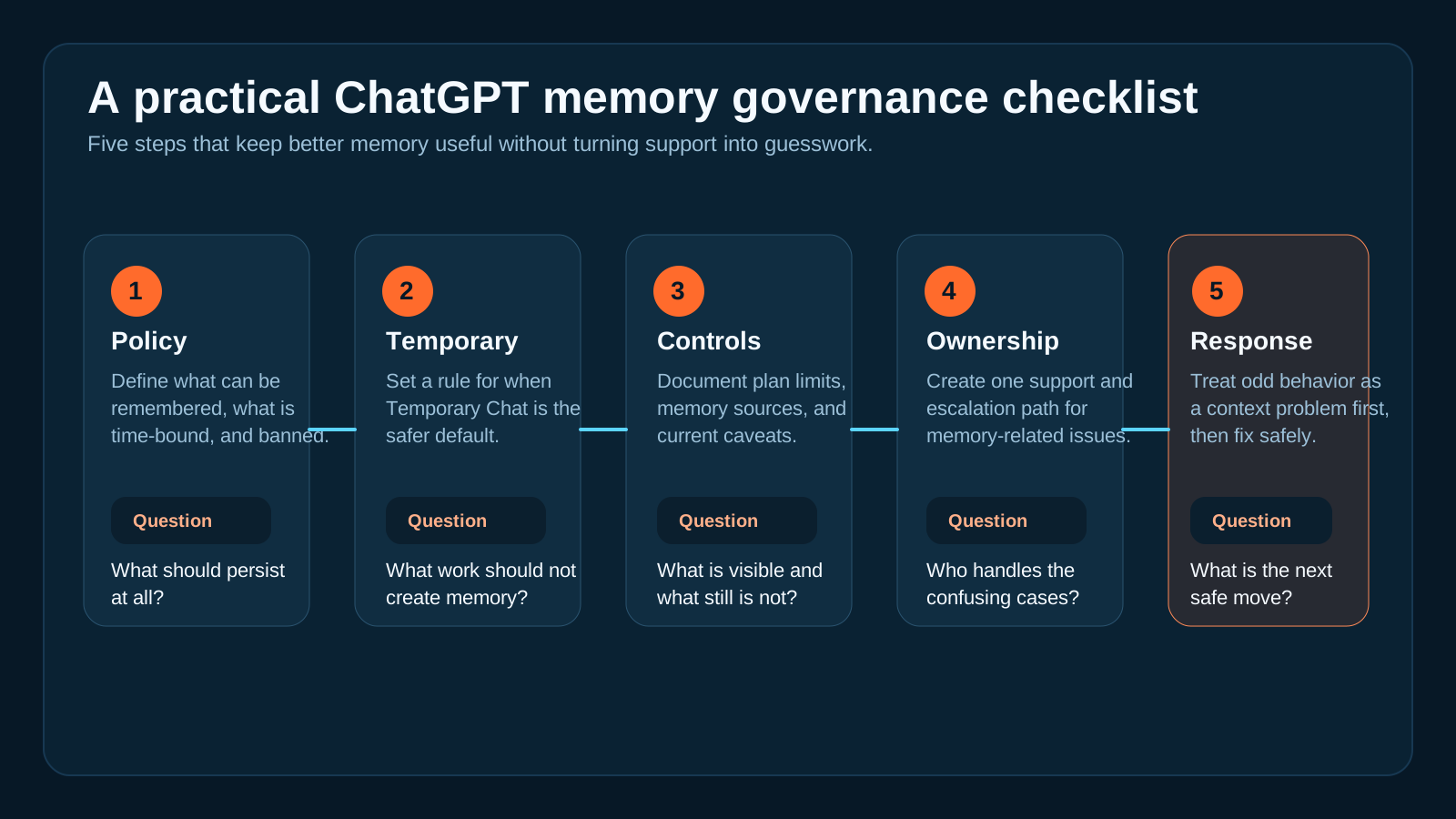
A rollout checklist beats improvising policy after the first confusing support thread.
Where OpsRabbit fits
OpsRabbit is useful in the moment where the problem stops being theoretical.
That usually sounds like this:
- a user says ChatGPT keeps bringing in the wrong context
- an admin is not sure whether memory or source inputs are involved
- support needs one clean story before changing settings or advice
OpsRabbit helps teams assemble the working context faster:
- what changed
- what sources or memory paths are likely involved
- who owns the decision
- what the next safe action should be
That does not replace OpenAI's controls. It reduces the time lost between "something is off" and "we know how to handle it."
Practical takeaway
Better memory is good for users because it reduces repetition and makes ChatGPT more context-aware.
But for enterprise admins, the real job is not admiring the feature.
The job is deciding:
- what should persist
- what should stay temporary
- who owns support
- how to investigate memory-influenced behavior without guesswork
That is why better ChatGPT memory is becoming a governance decision for enterprise admins.
CTA
If your team is preparing for more persistent AI workflows, book a walkthrough to see how OpsRabbit shortens time-to-context for AI admin, change review, and incident-response workflows.
FAQs
Why is better ChatGPT memory a governance decision?
Because the more useful and more automatic memory becomes, the more teams need rules for what should persist, what should stay temporary, and how to investigate memory-influenced behavior when it looks wrong.
What should admins decide before broader rollout?
They should define allowed memory categories, when Temporary Chat should be preferred, who owns support escalations, and how to gather evidence before changing settings or policy.
Sources
- OpenAI, Dreaming: Better memory for a more helpful ChatGPT - published July 2026.
- OpenAI Help Center, Memory FAQ - accessed July 9, 2026.
- OpenAI Help Center, Data Controls FAQ - accessed July 9, 2026.
- OpenAI, Enterprise privacy at OpenAI - accessed July 9, 2026.
Last Updated
2026-07-09
Ready to Transform Your Operations?
Ask for a demo today. Experience how OpsRabbit can reduce your MTTR by up to 90%.