Quick answer: on June 15, 2026, ChatGPT adds new Google Drive, BigQuery, and Google Meet-related actions that can require new Google OAuth scopes. If your workspace leaves those actions enabled without aligning ChatGPT settings and Google Workspace approvals, users can run into reconnect, authorization, or admin approval errors.
TL;DR
- OpenAI says new Google app actions arrive on June 15, 2026 for Google Drive files, BigQuery, and Google Meet actions surfaced under Google Calendar.
- Those actions can require additional Google OAuth scopes, so this is an admin review window, not just a product release note.
- Existing Google connections are not automatically removed, but newly enabled actions can still fail if the needed scopes are blocked.
- The practical job is simple: check which actions are enabled, match them to approved scopes, and decide what should stay on before users discover the mismatch for you.
What changes on June 15, 2026
The useful place to start is not with abstract AI governance. It is with the actual change.
OpenAI's Google App for ChatGPT FAQ says that starting June 15, 2026, ChatGPT adds new Google app actions for Google Drive files, BigQuery, and Google Meet actions surfaced under Google Calendar. It also says those actions require additional Google OAuth scopes in Google Workspace.
That matters because this is not just "the Google app got better."
It means the action surface changes. The scope set can change. The approval path can change. And if ChatGPT workspace settings and Google Workspace app access are not aligned, the first signal your team sees may be a user reporting a vague permission error.
Why this is an ops problem
There is a specific pattern here that ops teams know well.
A product team calls it a feature update. Security sees scopes. Workspace admins see API controls. Help desk sees reconnect issues. Users just see that something worked yesterday and now does not.
That is already enough to make this an operational change.
OpenAI is fairly direct about the coordination required. Before June 15, 2026, it says the people managing ChatGPT workspace settings and the people managing Google Workspace app access should coordinate. If your workspace is configured to enable new app actions by default, OpenAI says new Google actions may become available to users on June 15 unless an admin disables them.
That is not scary language. It is practical language. But it also means somebody should own this review before rollout day.
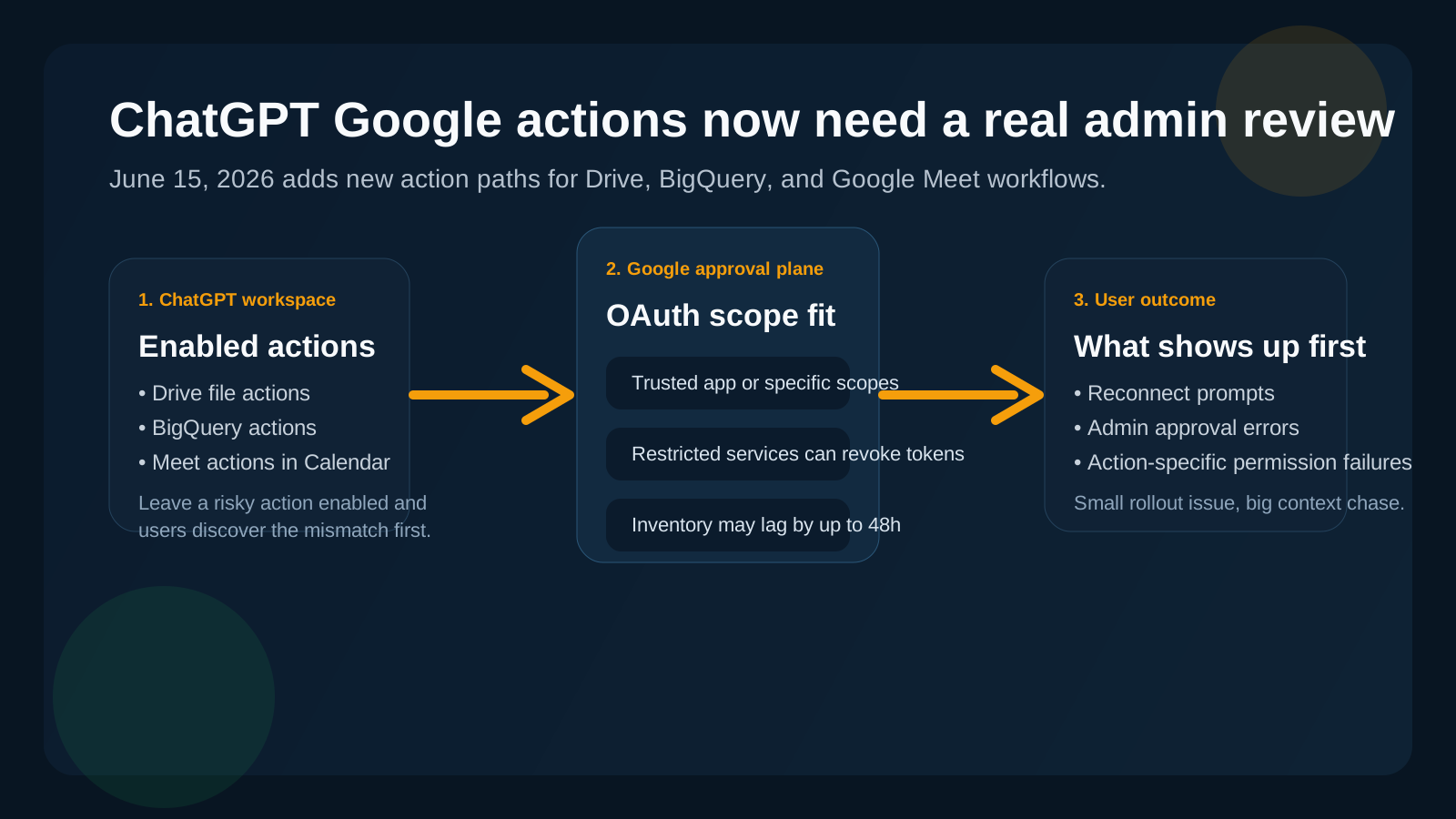
If action settings and Google approvals drift apart, the problem usually shows up first as confusing user-facing errors.
Short answer
Treat this like a small production change.
Not because every tenant will break, and not because OpenAI says existing Google connections are removed. It explicitly says they are not removed because new scopes are introduced.
Treat it like a production change because newly enabled actions can still trigger reconnect, authorization, or admin approval issues when a user actually tries to use them. That is enough to justify a real owner, a review window, and a rollback plan.
The practical checklist before June 15
1. Review which Google actions are enabled in ChatGPT
Start in ChatGPT workspace app settings.
OpenAI's FAQ says admins can disable any Google action whose scope they do not want to approve. That is the simplest decision rule in the whole rollout:
- if you want users to use an action, approve the scope and keep the action enabled
- if you do not want to approve the scope, disable the action
The messy state is leaving an action enabled while the scope stays blocked.
2. Match enabled actions to the scopes your tenant actually allows
OpenAI helpfully lists the relevant scopes.
The new or newly important ones include Google Meet-related Calendar scopes, BigQuery scopes, and broader Drive scopes for actions that create, update, share, move, upload, copy, or delete files.
That makes this a concrete review, not a theoretical one. Someone can map the enabled actions to the approved scopes and find the gap.
3. Decide whether the ChatGPT/OpenAI app should be trusted or explicitly approved for specific scopes
OpenAI says Google Workspace admins should either mark the ChatGPT/OpenAI OAuth app as Trusted, if that fits the organization's policy, or explicitly approve every Google scope required by the actions that stay enabled.
That decision is where governance becomes operations.
One path is broader and simpler. The other is narrower and more deliberate. Either way, it should be an intentional call, not an accident discovered through failed user flows.
4. Remember that changing Google access policy can have side effects
Google Workspace's app access guidance says that if access is changed to Restricted, previously installed apps that are not trusted stop working and tokens are revoked.
That is useful for control, but it also means rollout or remediation decisions can create visible user impact.
Google also notes that the accessed apps list can lag by up to 48 hours after token grant or revocation. So if you are trying to debug this in a hurry, your inventory view may not be perfectly fresh.
5. Plan for rollout-day support noise
OpenAI says existing Google connections are not removed when new scopes are introduced. That is the good news.
The catch is that users may still need to reconnect, or may see errors when using a newly enabled action whose scope is not approved.
That means the likely incident is not "everything is broken." It is "a subset of users hit confusing reconnect or permission errors and nobody immediately knows whether the issue is in ChatGPT settings, Google scope approval, or the specific action path."
That is exactly the kind of small but messy operational problem that benefits from clear ownership.
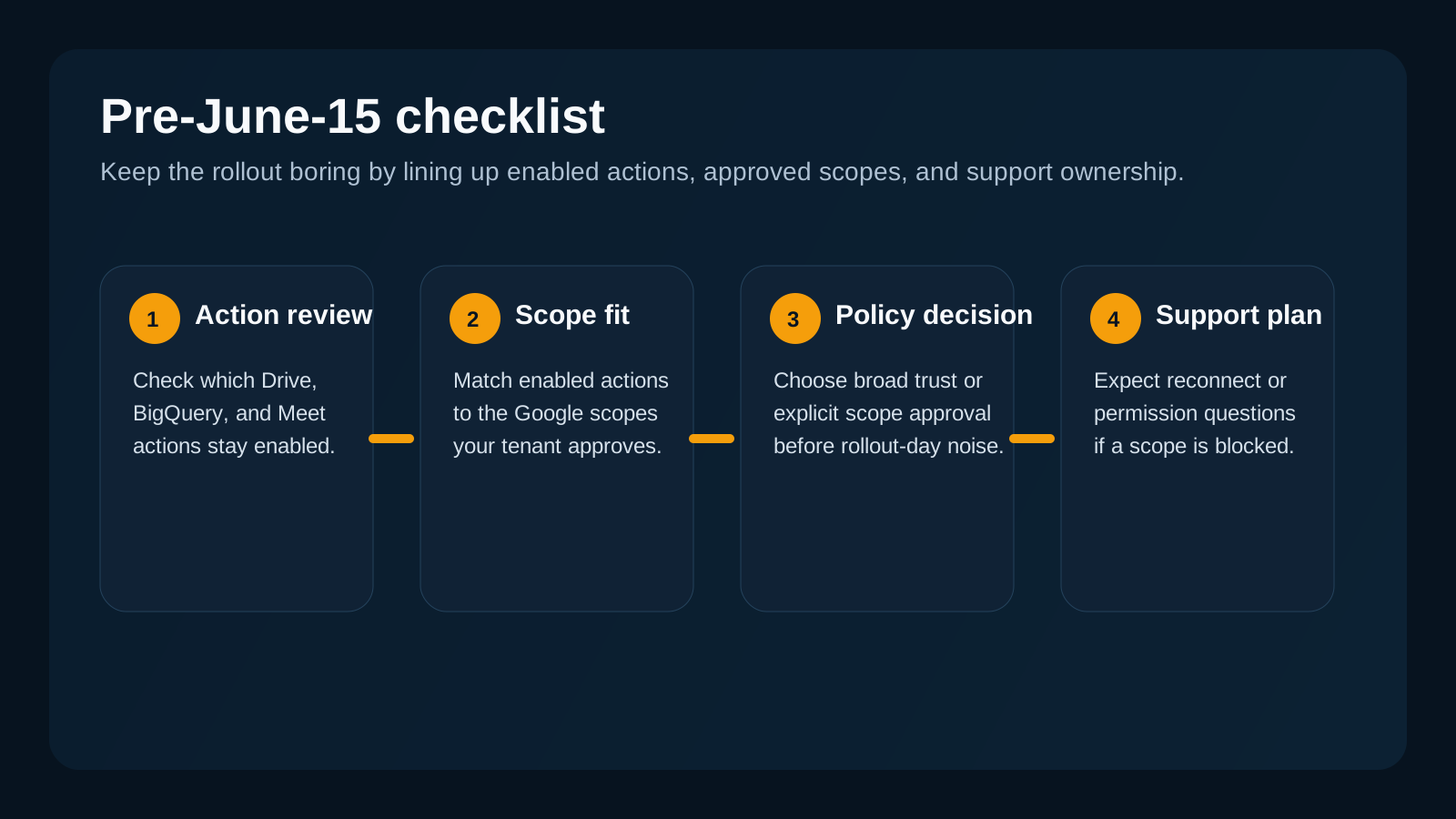
The practical win is not perfect governance. It is reducing the odds that rollout day turns into a cross-team guessing game.
What the first bad hour usually looks like
If this is handled late, the investigation tends to look familiar.
One person checks ChatGPT workspace settings. Someone else opens Google Admin API controls. Support asks whether users should reconnect. Security asks whether broad trust was granted to the ChatGPT/OpenAI app. Another admin wonders whether the issue is isolated to BigQuery, Drive write actions, or Google Meet artifacts surfaced under Calendar.
The work is not deeply technical. It is just fragmented.
And that fragmentation is where time disappears.
Why least privilege still matters here
This rollout is also a useful reminder that action-capable AI systems need clear identity and scope boundaries.
Microsoft's May 14, 2026 guidance on autonomous agents makes the broader point well: agents need unique, verifiable identities and narrowly scoped permissions so teams can assign accountability and trace actions cleanly.
That principle applies here too. The harder it is to tell which app, scope, user path, or approval decision is involved, the slower your team gets when something goes sideways.
Where OpsRabbit fits
OpsRabbit is useful in exactly this middle layer between "users are getting errors" and "we know the next safe fix."
The problem is usually not the absence of documentation. It is the time it takes to assemble the incident picture:
- which action is enabled
- which scope it needs
- whether that scope is approved
- who owns the app setting
- who owns the Google policy decision
- what changed most recently
That is time-to-context work.
If your team can answer those questions quickly, this rollout stays boring. If not, a small feature change becomes a noisy support and operations issue.
Final thought
The wrong way to look at June 15 is "ChatGPT added a few more Google actions."
The better framing is that a user-facing AI app is gaining new action paths into systems your admins already govern carefully. That deserves the same habits you would apply to any other scoped integration change: review, approval, ownership, and a quick rollback path.
If you do that before June 15, 2026, this probably stays uneventful.
That is the goal.
FAQs
What should admins check before June 15, 2026?
Review which Google actions are enabled in ChatGPT, confirm the ChatGPT/OpenAI app is trusted or approved for the required Google scopes, and disable any action whose scope you do not want to allow.
Will existing Google connections be removed automatically?
No. OpenAI says existing Google app connections are not removed because new scopes are introduced, but users can still see errors when they use a newly enabled action whose scope is not approved.
Sources
- Google App for ChatGPT - Data Controls FAQ - OpenAI Help Center, updated June 6, 2026.
- Admin Controls, Security, and Compliance in apps (Enterprise, Edu, and Business) - OpenAI Help Center, updated June 6, 2026.
- Control which apps access Google Workspace data - Google Workspace Admin Help, accessed June 6, 2026.
- Control API access with domain-wide delegation - Google Workspace Admin Help, accessed June 6, 2026.
- Defense in depth for autonomous AI agents - Microsoft Security Blog, May 14, 2026.
Last Updated
2026-06-06
Ready to Transform Your Operations?
Ask for a demo today. Experience how OpsRabbit can reduce your MTTR by up to 90%.