Quick answer: if a browser-using agent can open untrusted pages on the same machine that exposes local control planes, credentials, or powerful tools, one page can become a real workstation incident. The safe default is isolation, explicit approvals, and separate identity.
TL;DR
- Browser-capable agents are no longer "just an AI UX feature." They can touch the same sites, forms, sessions, and local services a human operator can.
- Microsoft's June 2026 AutoJack research showed a clear exploit shape: malicious page, localhost trust, unsafe local control plane, host-level execution path.
- The biggest mistake is still architectural, not model-specific: teams keep untrusted browsing, localhost trust, and privileged developer context on the same machine.
- OpsRabbit fits in the response gap between the first suspicious browser action and the first safe containment move.
What changed
For a while, browser automation in AI products was mostly discussed like a convenience upgrade.
The agent can open a dashboard. Click a button. Summarize a page. Copy data from one system into another. Great demo.
The problem is that browsers do not only reach webpages. They sit inside a host environment that often has:
- localhost services
- developer sessions
- tokens
- local files
- debug tools
- code execution paths
That makes the blast radius much bigger than most teams first assume.
Microsoft's AutoJack research on June 19, 2026 made that painfully concrete. The exploit chain showed how a single malicious webpage could turn an AI browsing agent into a remote code execution path on the host by abusing localhost trust, missing authentication, and unsafe parameter handling in a local control path.
Microsoft was also careful about scope. It said the exact vulnerable route was addressed before the affected AutoGen Studio path shipped to PyPI. That matters.
But the deeper lesson matters more.
The issue is not one unlucky product bug. The issue is a recurring architecture pattern:
- A powerful local control plane exists on a workstation.
- That control plane assumes localhost is trusted enough.
- An agent on the same host is allowed to render attacker-controlled content.
That is enough to create a real incident surface.
Short answer
Browser-using AI agents become a host-security incident when responders can no longer treat the host as a passive container around the model.
Once the agent can browse, click, read, and act on live content, the response question changes from "did the model say something unsafe?" to "what else could this host now reach, trigger, or leak?"
That is why this belongs in ops and incident response, not only in model safety review.
How one hostile page turns into a host problem
The easiest way to understand the risk is to follow the chain.
1. The agent opens attacker-controlled content
Maybe the user points the agent at a page. Maybe the page comes through a search result, a ticket, an email workflow, or a copied URL.
At that point the browser agent is no longer only interacting with your UI. It is rendering untrusted external content.
OpenAI's current computer-use guidance is direct about this. It says prompt injections can appear inside webpages and fake UI elements, and it tells operators to treat suspicious page instructions as a stop point, not just a weird output.
2. The page reaches something local that should have been harder to reach
This is where a lot of teams still get lazy.
They hear "localhost" and think "internal."
Microsoft's AutoJack writeup is useful because it breaks that habit. The page's JavaScript reached a local MCP WebSocket route and turned that into host action through unsafe parameter handling. The exact route is less important than the pattern:
- local control plane
- weak or missing authentication
- dangerous action exposed behind a loopback assumption
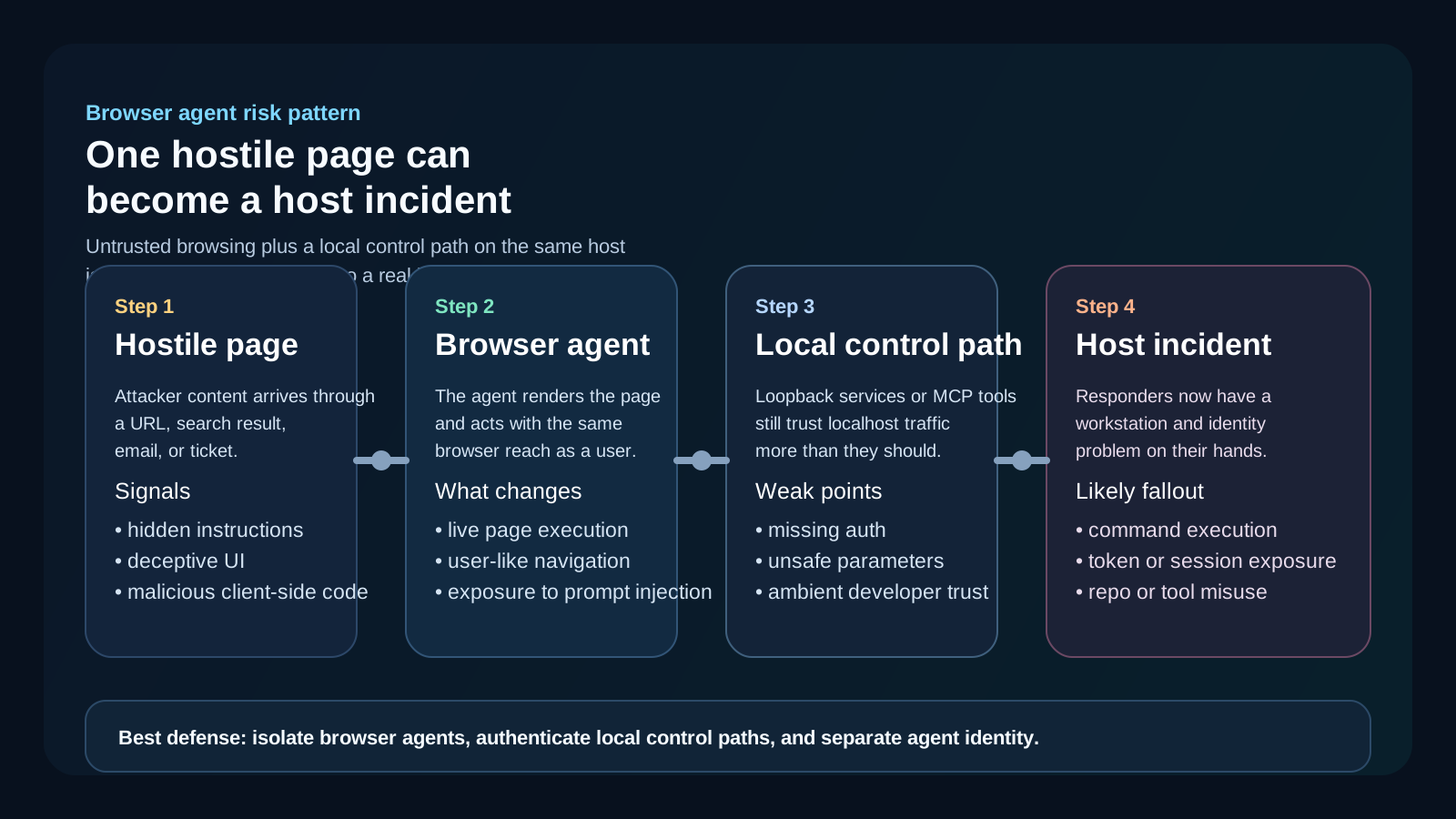
The dangerous move is not browser automation by itself. It is letting hostile web content share a machine with local control planes that trust loopback traffic too much.
3. The host inherits more trust than the agent should have had
This is the part ops teams feel later in the incident.
If the same host also carries developer identity, saved sessions, local tools, repo access, or sensitive tokens, the incident stops being a browser oddity and starts looking like a workstation compromise with operational consequences.
That can mean:
- credential review
- session invalidation
- local service audit
- repository or environment scoping
- endpoint investigation
The "AI issue" becomes a normal incident with extra context problems layered on top.
The first hour is mostly a context problem
This is the pattern across a lot of newer AI-connected incidents.
The first alert is rarely definitive. It is usually one of these:
- an agent opened something strange
- a local process spawned unexpectedly
- a suspicious domain showed up during a browser-agent session
- a tool call did something it should not have done
- a developer reports bizarre behavior on the host running the agent
Then the room starts asking the same questions:
- Which hosts run browser-capable agents right now?
- Which local services or MCP-style control paths are reachable from those hosts?
- Did the agent run under its own identity or inherit a developer's session?
- What secrets, files, or local tools were in scope?
- What changed recently in the agent workflow, tool list, or localhost service configuration?
- Is this a prompt-injection event, a local trust problem, or both?
If those answers live in five systems and two chat threads, the incident gets noisy fast.
Five controls that matter more than another policy memo
1. Treat localhost like an attack surface
If an agent can browse untrusted pages, loopback is not a magical trust zone anymore.
Sensitive control planes should require real authentication and authorization even when they only listen locally.
2. Isolate browser-capable agents from daily-driver workstations
OpenAI's guidance says to treat computer use as a security boundary and to run it in an isolated browser or container whenever possible.
That is the right mental model.
If the agent needs live browsing, give it a contained environment instead of your most convenient workstation.
3. Separate agent identity from developer identity
Microsoft's guidance around the AutoJack pattern is blunt here too: do not let the agent inherit more trust than it needs.
Use a separate low-privilege identity, separate profile, or separate container or VM where practical.
That turns a bad browsing event into a smaller containment job.
4. Put high-risk actions behind explicit approvals
Browser agents are especially good at looking "helpful" right before they do something irreversible.
High-risk actions such as code execution, file writes, credential handling, admin changes, and outward data transmission should not ride on soft assumptions.
They need explicit review or policy-backed approval.
5. Red-team the workflow, not only the model
Microsoft's AI Red Teaming Agent guidance is useful here because it focuses on agent-specific risks:
- prohibited actions
- sensitive data leakage
- indirect prompt injection
- unsafe tool behavior
- task adherence failure
That is closer to the real risk shape than generic model evals alone.
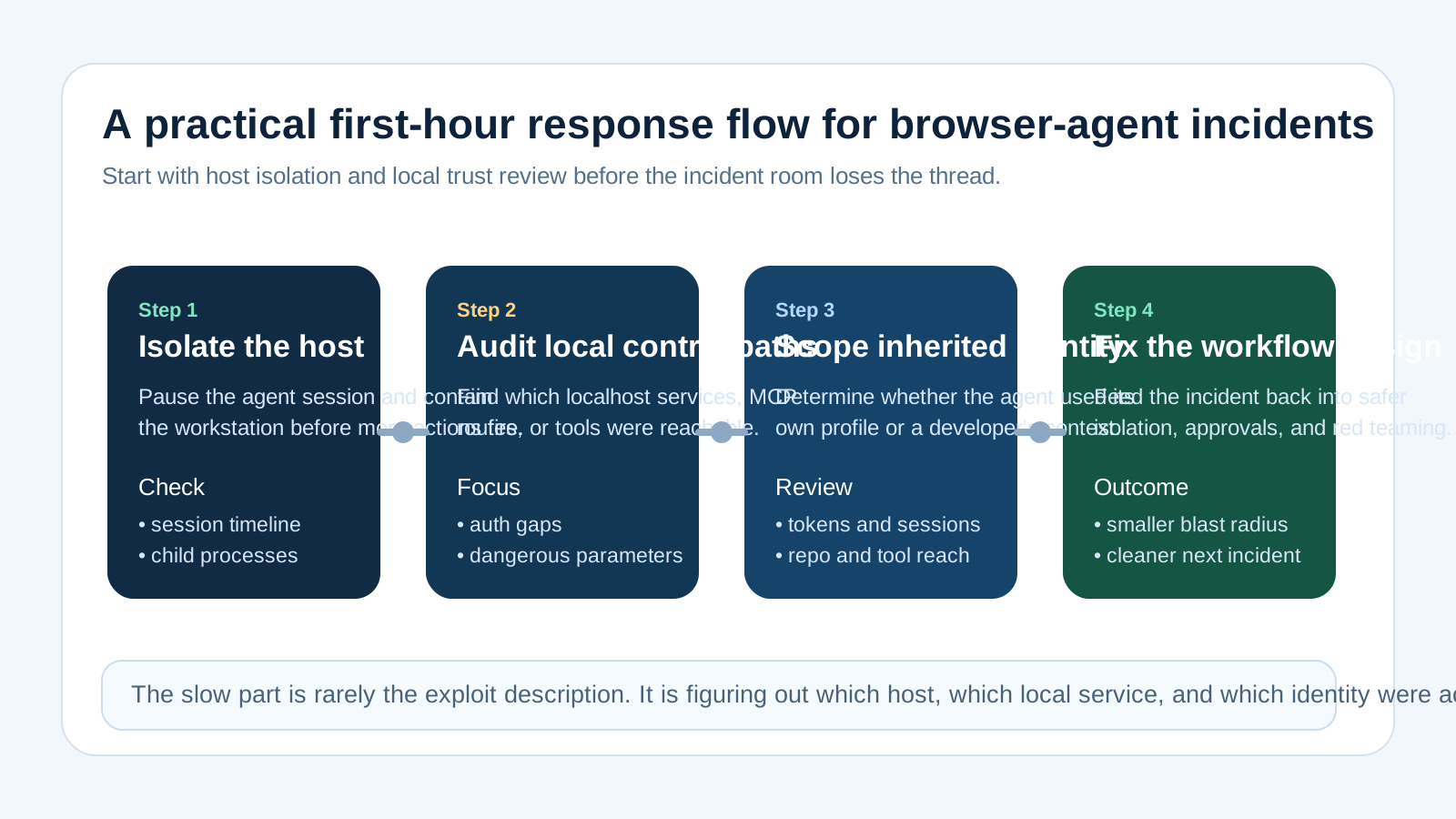
A strong first-hour flow isolates the host, scopes local control planes, checks identity inheritance, and tests whether the workflow design made the incident easier than it should have been.
Where OpsRabbit fits
OpsRabbit is not an endpoint agent and it is not a browser sandbox.
The useful role is faster context assembly when a suspicious AI-connected workflow becomes operationally messy.
For incidents like this, responders need a usable picture of:
- what the agent was trying to do
- which host and identity were involved
- which local or external tools were reachable
- what changed recently
- which next containment step is safest
That is the time-to-context gap.
When browser agents, local services, approvals, and operational ownership are spread across too many systems, OpsRabbit helps teams build a shared incident narrative faster instead of forcing responders to reconstruct it from scratch.
Final thought
I do not think the right takeaway is "never use browser agents."
The right takeaway is that browser agents should be treated like a real execution surface with host, identity, and containment consequences.
If the same machine can both render hostile content and reach privileged local control paths, the incident room will eventually discover that the hard way.
Better to design for that now.
FAQs
Why is localhost not a safe boundary for browser agents?
Because a browser-capable agent can reach the same local services the workstation can reach. If those services trust loopback traffic or accept attacker-influenced parameters, a malicious page can turn that trust into host-level action.
Is this only an AutoGen Studio issue?
No. Microsoft used AutoGen Studio to demonstrate the pattern, but the broader risk applies whenever untrusted browsing, powerful local tools, and ambient workstation trust share the same machine.
What should teams do first?
Inventory which hosts run browser-capable agents, isolate those hosts from sensitive local control planes, separate identities, and test the workflows for indirect prompt injection and prohibited actions before broad rollout.
Sources
- AutoJack: How a single page can RCE the host running your AI agent - Microsoft Security Blog, published June 19, 2026.
- Computer use - OpenAI developer documentation, accessed June 26, 2026.
- AI Red Teaming Agent - Microsoft Learn, accessed June 26, 2026.
Last Updated
2026-06-26
Ready to Transform Your Operations?
Ask for a demo today. Experience how OpsRabbit can reduce your MTTR by up to 90%.