Quick answer: once AI memory can preserve untrusted context across sessions, the problem stops being "what did the model say?" and becomes "what got written, what can still use it, and what should we contain first?"
TL;DR
- Persistent AI memory changes a one-turn prompt problem into a cross-session operations problem.
- Microsoft's latest guidance treats memory as both stored data and behavioral control surface, which is the right mental model for responders.
- Microsoft also documented real-world attempts to plant persistent recommendations into AI memory through helpful-looking summary links.
- The hard part is rarely noticing odd behavior. It is rebuilding enough trusted context to act without making the blast radius worse.
What Problem Are We Solving?
Teams already know how to talk about prompt injection.
They are less prepared for the next step: a system that remembers something it should not, then carries that state into a different workflow hours or days later.
That changes the operating questions fast:
- what was written to memory
- where it came from
- whether it was explicit, inferred, or injected
- what later actions can still consume it
- which control should be narrowed before the team loses track of the state story
That is not only an AI quality issue. It is an incident-response issue.
Short Answer
AI memory poisoning becomes an ops incident when persistent context can influence future behavior in ways the team cannot quickly explain, scope, or contain. Once that happens, the response burden moves from one suspicious prompt to the entire write, retrieve, and action path around memory.
Why This Matters Now
Microsoft's June 22 security post on guarding AI memory is the clearest public signal so far. It says memory turns AI from a stateless tool into a learning collaborator and lets attackers shape behavior gradually over time instead of trying to win in one prompt.
That matters because delayed behavior is much harder to investigate than a single visible jailbreak. The original malicious input can be gone while its effect survives in memory.
Microsoft's June 3 memory-safety guidance goes further and says memory should be treated as both high-value data and a control plane. That is exactly the framing operations teams need. If memory influences future recommendations, summaries, tool calls, or workflow choices, it belongs inside the incident model.
Then Microsoft published something even more practical in February: AI Recommendation Poisoning. The company said it found dozens of public attempts to sneak "remember this brand" instructions into AI assistants through summary links and hidden prompt parameters. Even if platform defenses keep improving, the message is obvious: people are already trying to manipulate persistent AI state in the wild.
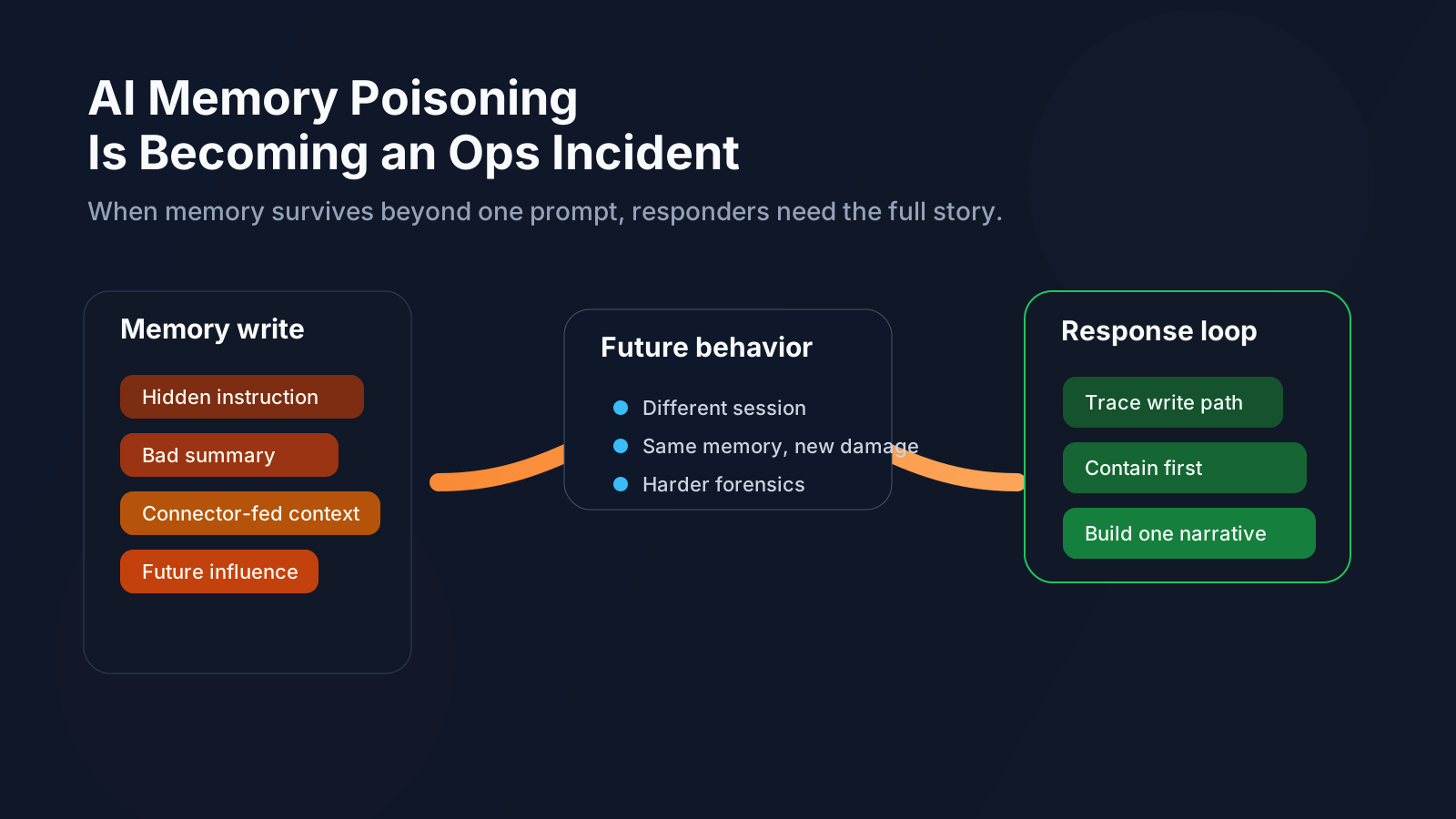
If the system remembers poisoned context, the incident can outlive the prompt that introduced it.
What AI Memory Poisoning Actually Looks Like
This does not require a Hollywood-style compromise.
The simpler pattern is that untrusted content finds a path into memory, and that memory later gets treated as useful context.
That can happen through:
- shared documents with hidden instructions
- connector-fed content that gets summarized too confidently
- user-editable fields that are treated like trusted preferences
- memory tools that do not distinguish intent from payload
- AI helper links that prefill prompts with persistence commands
The result is subtle but serious: later behavior starts leaning on stored context that was never safe or never meant to persist.
Why This Becomes An Ops Incident
The operational pain is not the definition. It is the reconstruction work.
Responders often need to piece together:
- chat or session history
- files and connectors that fed the memory write
- retrieval logs
- tool-call traces
- recent prompt or policy changes
- memory settings and access scopes
- audit events showing who changed what
That is why single-turn defenses are not enough. Microsoft says attackers are already thinking across turns. OWASP's current LLM risk framing still centers prompt injection and excessive agency, and memory poisoning sits right on top of both. If a model can act and remember, responders need to investigate the remembered part too.
What To Check First
If memory-driven behavior looks wrong, start with the path, not the symptom.
1. Trace the write path
Find the source of the memory update.
Look at:
- recent chats
- processed files
- connector inputs
- explicit memory tools or settings
- anything that could have converted external content into durable state
2. Scope what the memory can still influence
You need to know whether the stored state can affect:
- recommendations
- summaries
- tool calls
- routing or prioritization
- downstream workflows
This is the step that tells you whether you have a weird output or a live incident.
3. Contain before you perfect the root cause
If the path is still active, reduce blast radius first.
That can mean:
- narrowing or disabling memory
- disabling a connector
- rolling back a prompt or retrieval change
- forcing human review on sensitive actions
- switching the workflow to a safer fallback path
4. Keep the evidence trail
Memory incidents are messy when nobody can answer:
- who wrote it
- when it changed
- what it was derived from
- where it propagated
That is why Microsoft's design guidance stresses provenance and full lifecycle logging of memory CRUD activity.
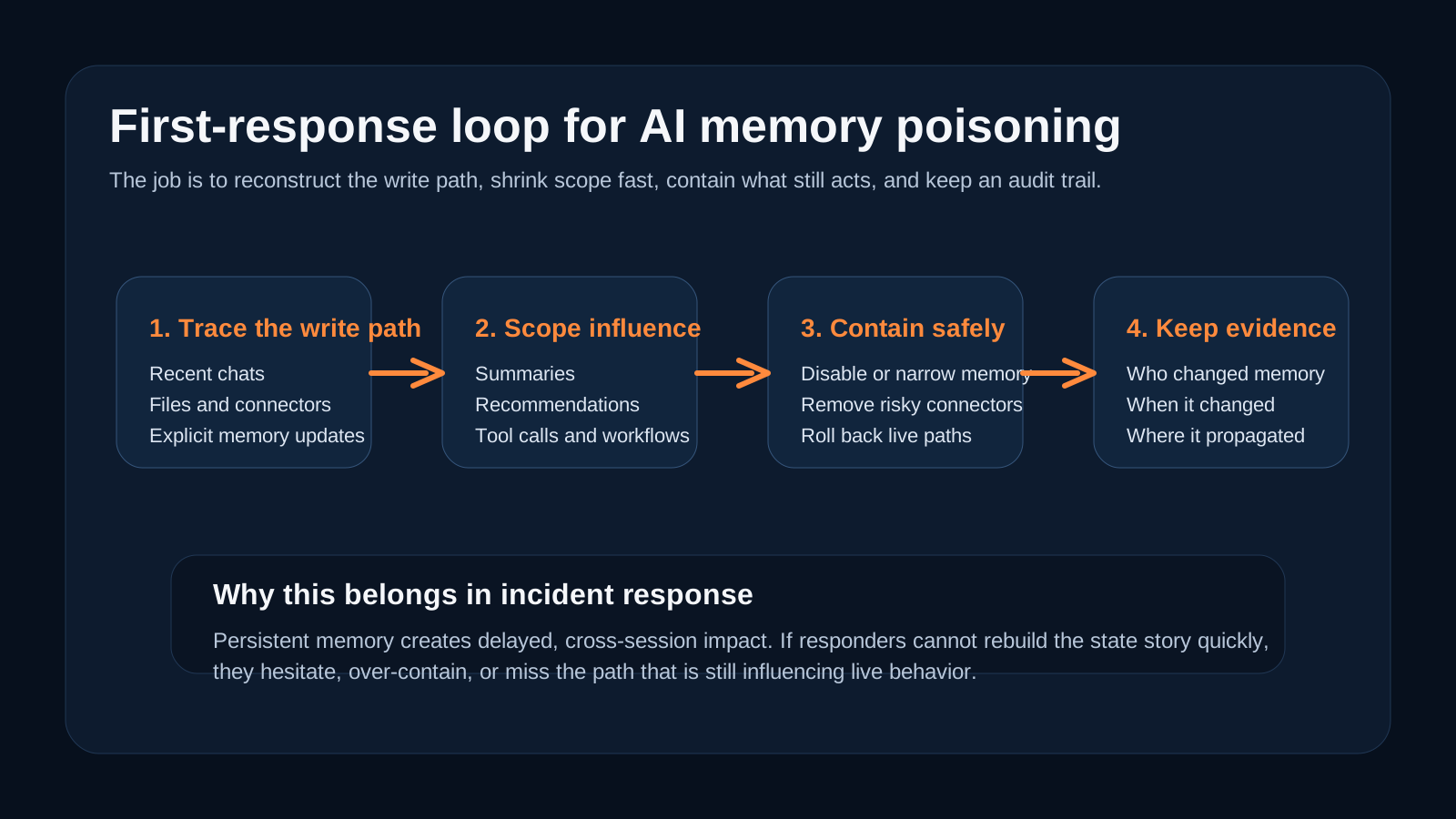
The operational challenge is not only detection. It is rebuilding enough trusted context to contain the right thing.
Where OpsRabbit Fits
OpsRabbit fits in the gap between "we saw suspicious AI behavior" and "we know the safest next step."
The product story here is not that OpsRabbit magically prevents memory poisoning. The real value is faster context assembly:
- what changed
- what memory or retrieved state is involved
- which systems and owners are in scope
- which evidence matters first
- which containment move is least risky
That is how teams shorten the most chaotic part of the response window.
Why These Keywords
The keyword set is intentionally practical.
AI memory poisoningcaptures the named risk category teams are starting to search forAI memory securitywidens reach to teams still learning the languageagent memory attackmatches Microsoft's framingAI incident responsekeeps the operations angle clearpersistent prompt injectioncaptures adjacent search intent without diluting the story
Final Thought
Memory is a capability feature.
It is also a persistence layer for mistakes, manipulations, and hidden instructions.
The teams that handle this well will not stop at "the model behaved strangely." They will ask:
- what got remembered
- why it was allowed to persist
- what is still consuming it
- what we should contain first
That is the shift.
FAQs
Why is AI memory poisoning an operations problem?
Because persistent memory can influence later summaries, recommendations, or actions long after the original input is gone, so responders need provenance, scope, and containment before they can act safely.
What should teams inspect first?
Start with the write path into memory, then scope what the stored state can still influence, then contain the live path before you spend too long perfecting root cause.
Sources
- Guarding AI memory - Microsoft Security Blog, June 22, 2026.
- Manage AI memory safety in agentic systems - Microsoft Learn, June 3, 2026.
- Manipulating AI memory for profit: The rise of AI Recommendation Poisoning - Microsoft Security Blog, February 10, 2026.
- OWASP Top 10 for Large Language Model Applications - OWASP.
- Safety best practices - OpenAI API documentation.
Last Updated
2026-06-27
Ready to Transform Your Operations?
Ask for a demo today. Experience how OpsRabbit can reduce your MTTR by up to 90%.